


Compare X (Twitter) Accounts
Put X accounts side by side and see how their audiences, posting habits and engagement really compare.
Circleboom : An Official Enterprise Developer
"Work with a trusted X Official Enterprise Developer to expand what's possible for your business. Each Official Enterprise Developer has been selected for the program after an extensive evaluation, and represents excellence, value, and trust." — X (Twitter)
Circleboom Twitter Tool
Circleboom Twitter management tool provides account analytics, follower/following insights, tools to check, fakes, spammers, inactive accounts, advanced account search and delete tweets services.
COMPARE FOLLOWERS, NOT JUST FOLLOWER COUNTS
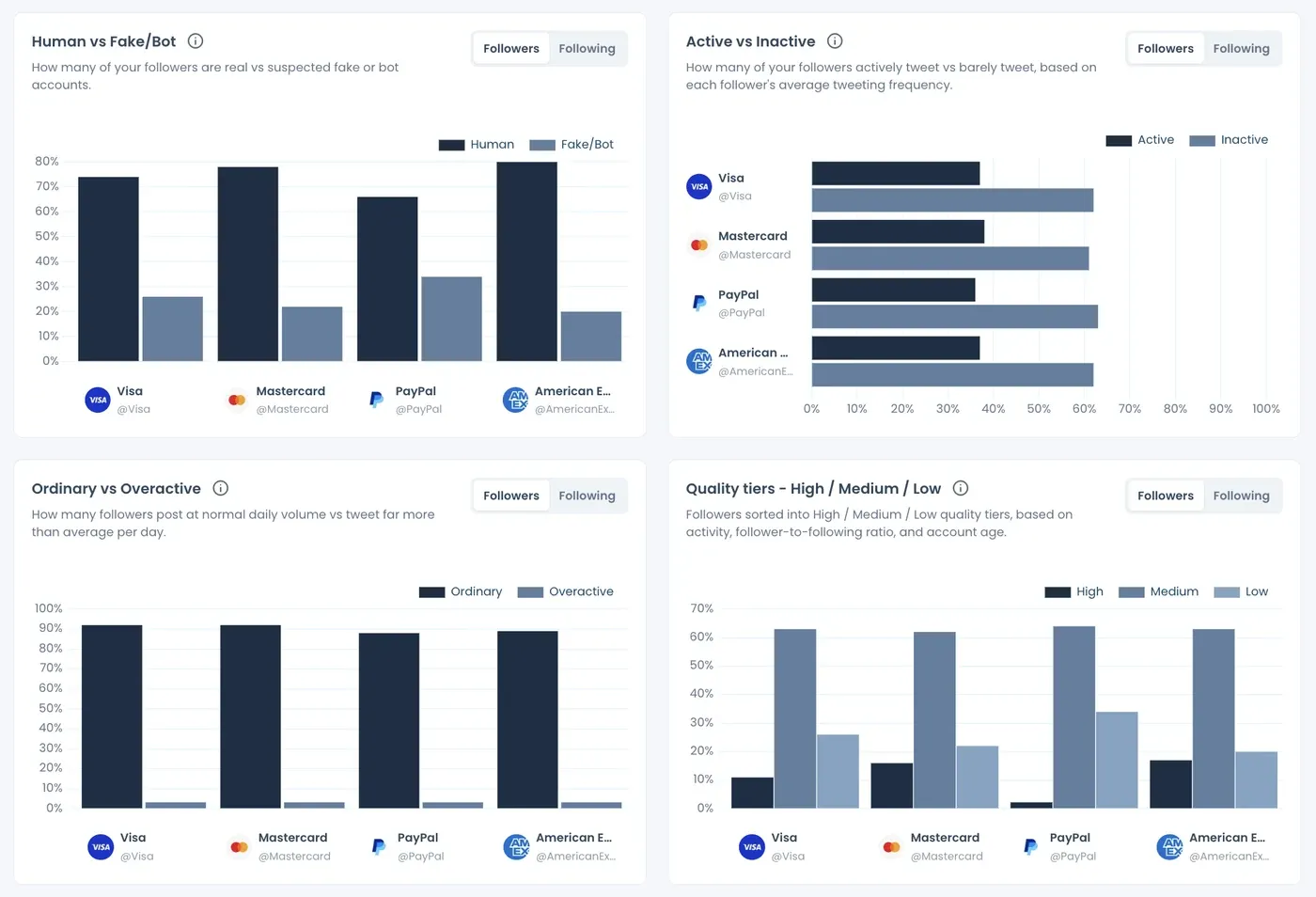
Two accounts with similar follower counts can have very different audiences. The report splits each account's followers into human vs fake or bot, active vs inactive, and High, Medium and Low quality tiers, with percentages and counts side by side.
These are review signals, not verdicts, and they show which audience can actually respond. Learn more about running a fake followers audit on Twitter.
COMPARE HOW OFTEN ACCOUNTS POST AND WHAT THEY POST
See how many posts each account shares per day, over its lifetime and in the last 30 days, and whether it posts steadily or in bursts. The content mix shows text, image, video and poll posts, and which format works best for each account.
Pair it with your own best time to post on Twitter to plan your next posts.
COMPARE INFLUENCERS BEFORE YOU WORK WITH THEM
Choosing between influencers? Compare their audience quality, where their followers live, how often they post and how people respond to them, all in one report. A large audience with a high fake or inactive share is weaker than it looks, so it pays to be aware of fake influencers.
Still building your shortlist? Find Twitter influencers in your niche first, then compare them.
COMPARE AUDIENCES BY COUNTRY AND LANGUAGE
See each account's audience by country and region, time zone, language and gender. Flip the Followers / Following toggle to read the same panels for the accounts each of them follows.
It answers a simple question before any partnership: do these accounts reach the market you care about? Here's how to see Twitter followers by country.
OFFICIAL X ENTERPRISE DEVELOPER
Circleboom is an Official X Enterprise Developer. Every account in your comparison is retrieved through official X APIs, so the numbers come from real X records, not scraping.
Comparing your account against rivals? Circleboom's Twitter competitor analysis is built for that.
COMPARE X ACCOUNTS SIDE BY SIDE
Looking at two profiles in two tabs tells you little. With Circleboom, you can compare X accounts side by side in one report: every account is pulled on the same date through official X APIs, and the same charts and tables repeat for each of them, so the differences are easy to see.
Want to see what a finished comparison looks like? Open the sample report before you run your own.
COMPARE ENGAGEMENT BETWEEN X ACCOUNTS
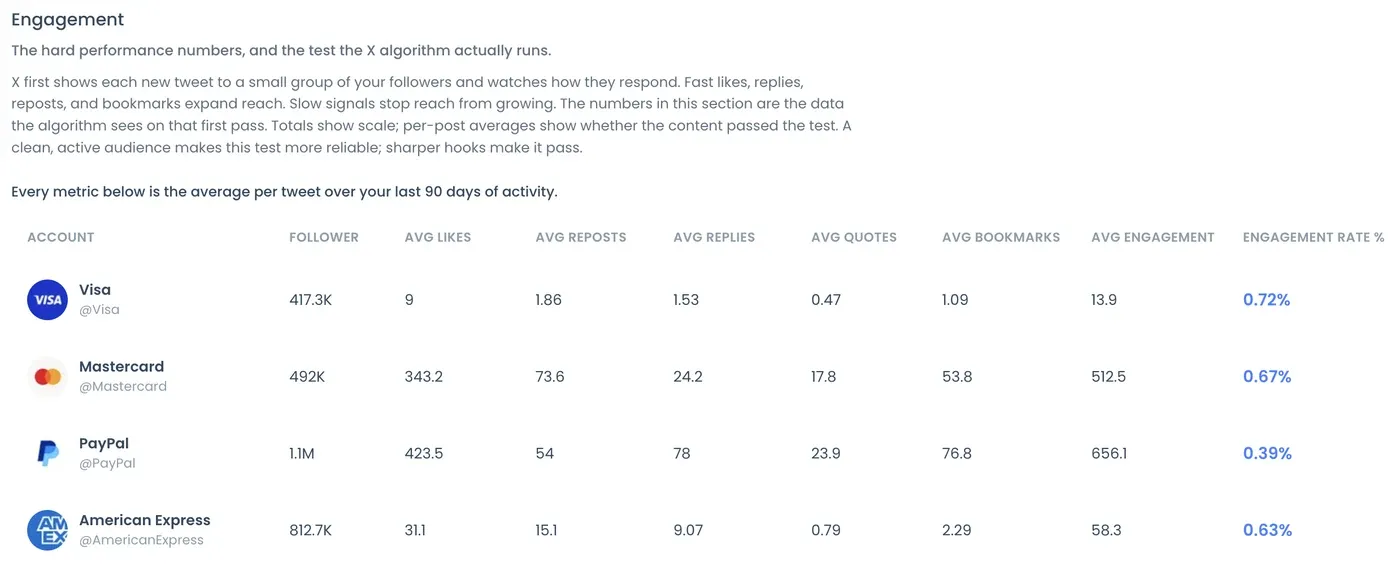
Compare average likes, reposts, replies, quotes and bookmarks per post, plus the engagement rate of every account. Engagement rate is total engagement divided by total impressions, so it shows how often people who saw a post interacted with it.
Not sure what counts as strong? Here's what a good engagement rate on Twitter looks like.
FIND COMMON FOLLOWERS BETWEEN X ACCOUNTS
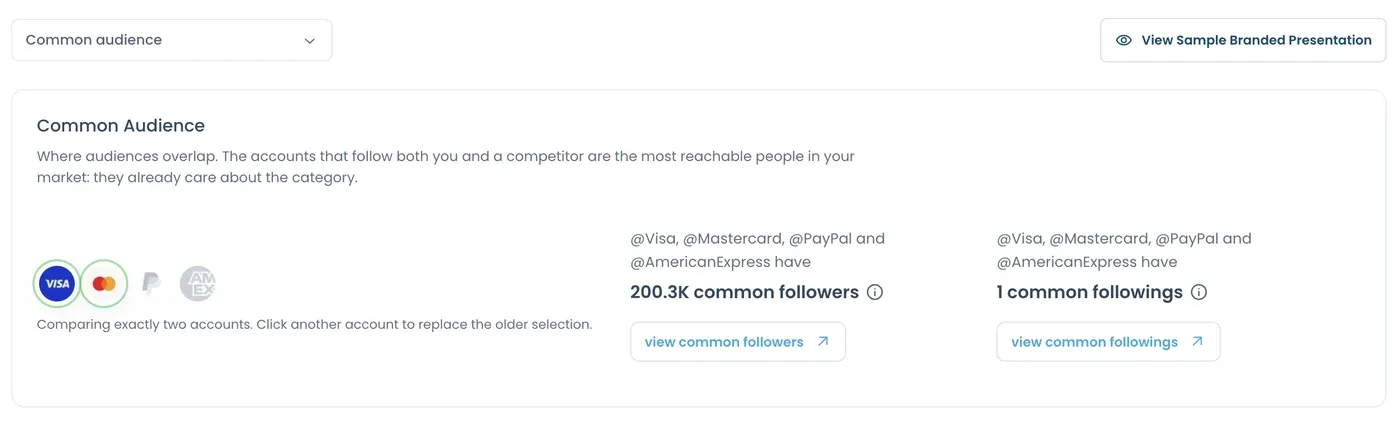
The Common Audience section shows how many followers and followings two of the compared accounts share, with links to view those accounts. It's a quick way to see whether two brands or creators speak to the same people.
Only need the shared accounts of two usernames? The Twitter Mutual Checker lists them right away. Here's more on how to find common followers between Twitter accounts.
COMPARE YOUR OWN X ACCOUNTS
Running a personal account and a brand account, or several accounts for one business? Compare them with each other to see which one has the stronger audience, the better engagement and the more consistent posting.
For a deep look at a single account, use Circleboom's X Account Analysis report.
COMPARE THE TOP TWEETS OF EACH ACCOUNT
Averages hide the posts behind them. The report puts each account's best-performing post side by side and lists its top posts by engagements, impressions, replies and bookmarks, so you can see what actually works for each one.
Want the posts as raw data? Export tweets to CSV.
HOW TO COMPARE X (TWITTER) ACCOUNTS
Here's how to compare X accounts side by side with Circleboom:
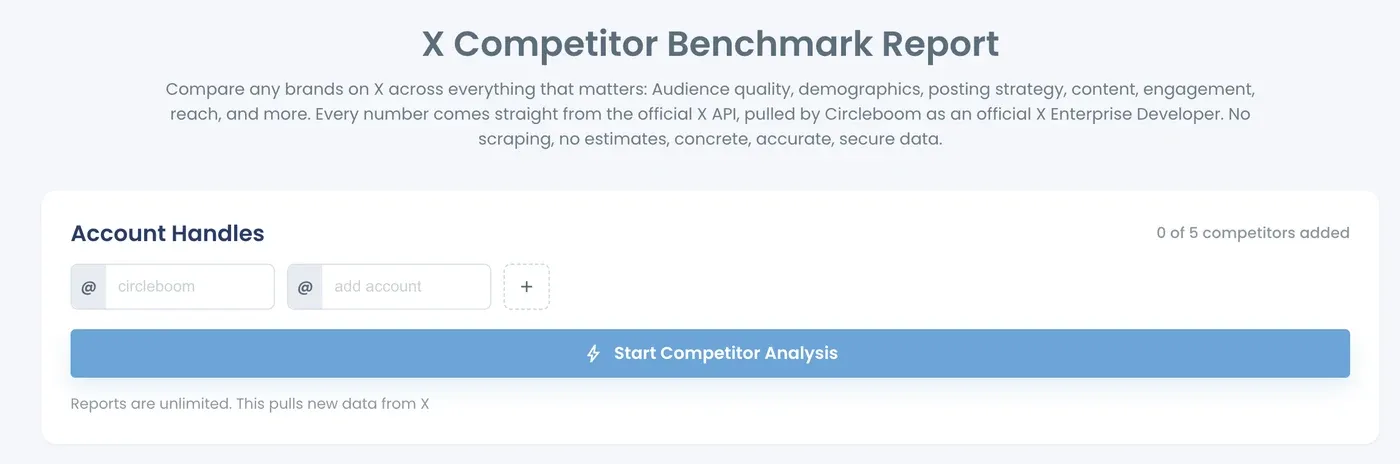
Enter the X accounts you want to compare.
Type the usernames into the form at the top of this page and add more accounts with +. Confirm them with Yes, compare them and enter your email address; we'll let you know when your report is ready. In Circleboom, you can also start from Monitoring > X Competitor Benchmark Report.
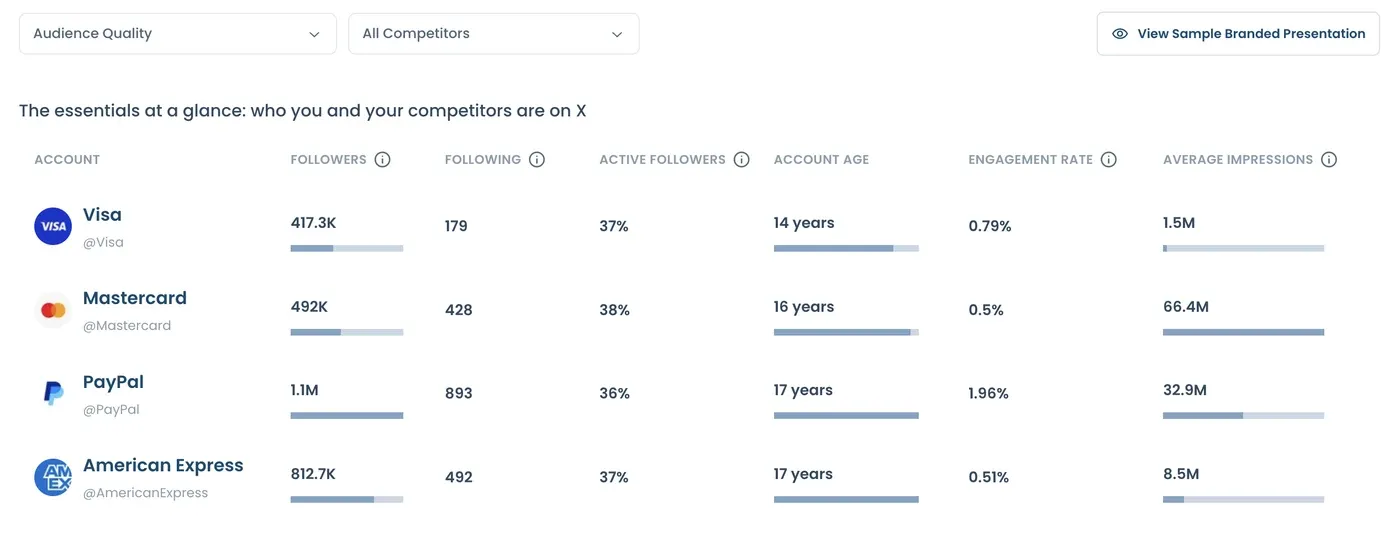
Read the essentials side by side.
The first table puts every account next to each other: followers, following, active followers, account age, engagement rate and average impressions.
Compare the quality of each audience.
See the human vs fake or bot share, active vs inactive followers and High, Medium and Low quality tiers for every account.
Compare engagement per post.
Average likes, reposts, replies, quotes, bookmarks and engagement rate show which account's audience responds more.
See the common audience.
Common Audience shows how many followers and followings two of the accounts share, with links to view them. Compare your X accounts now!
Frequently Asked Questions (FAQs)
Compare X (Twitter) Accounts
Put X accounts side by side and see how their audiences, posting habits and engagement really compare.