"Work with a trusted X Official Enterprise Developer to expand what's possible for your business. Each Official Enterprise Developer has been selected for the program after an extensive evaluation, and represents excellence, value, and trust." — X (Twitter)
Open the CREATE NEW YOUTUBE SHORT POST composer, upload your video, and use the Add More Accounts row to attach a TikTok account before you publish. Circleboom also lets you start from the TikTok composer and add a YouTube account instead, since both composers share the same upload, thumbnail, and Add Music steps behind the scenes. Score your Short with a track from the Genre, Tempo, and Mood browser, set your YouTube title, description, and category once, and Circleboom sends the same file to YouTube and TikTok in one publish action.
CROSS POST VIDEOS TO YOUTUBE AND FACEBOOK
From the YouTube Shorts composer, the Add More Accounts row lets you attach a connected Facebook Page alongside your YouTube channel, so the same video publishes to both the moment you hit Post Now, Schedule, or Post to Queue. Facebook's own Reels post type reaches this same short video engine from the other direction, following the same composer shape used for Instagram. Circleboom connects to Facebook Pages only, not personal profiles, so set up a Page connection first if you plan to cross post video to Facebook regularly.
ADD MUSIC TO VIDEOS
You can add music to videos from Circleboom's music library. You can find many pieces based on your interest and tastes.
CROSS POST VIDEOS TO MULTIPLE CHANNELS
Circleboom's cross post engine lets you upload one short video and publish it to YouTube, TikTok, Instagram, and Facebook without exporting and re uploading the same clip four separate times. From the YouTube Shorts composer, the TikTok composer, or the Instagram Reels tab, an Add Account row lets you attach additional platforms as destinations before you publish. Set your thumbnail once, write your caption once, and send the same video everywhere your audience already scrolls, through Post Now, Schedule, or Post to Queue, instead of juggling four separate upload screens.
CROSS POST VIDEO TO TIKTOK AND INSTAGRAM
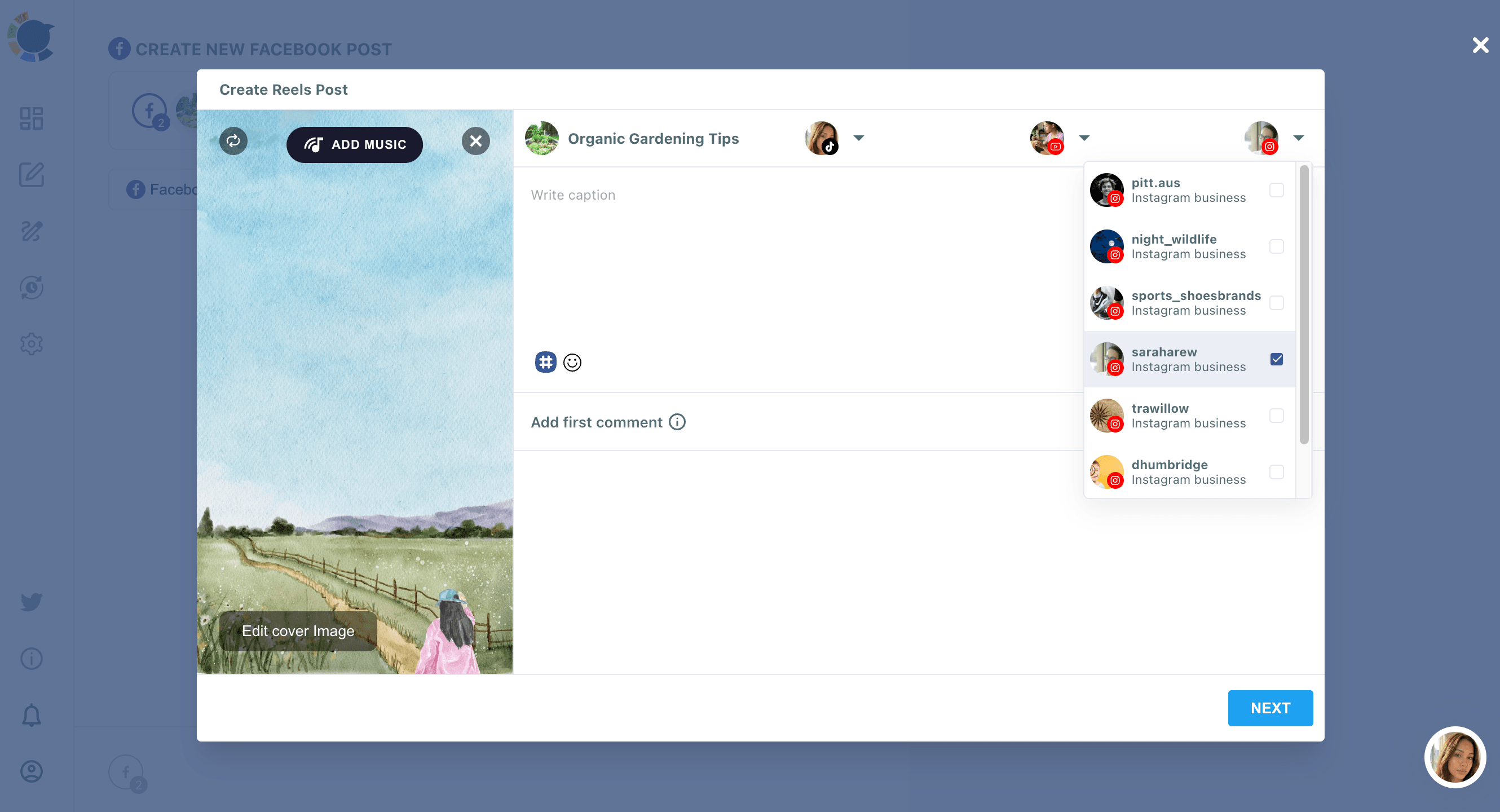
Open the TikTok composer, upload your clip, and add an Instagram account as a second destination before you post, or start from the Instagram Reels tab and add a TikTok account through the Create Reels Post modal instead. Either direction publishes the same video to both feeds at once. Write your caption once (a 2,200 character limit applies on both sides), let the Hashtag Generator add relevant tags in bulk, and confirm TikTok's required audience setting and Music Usage Confirmation before the post goes live on both platforms.
CROSS POST VIDEO TO TIKTOK, YOUTUBE & INSTAGRAM
The TikTok composer is the widest single entry point into Circleboom's cross post engine: upload one video, then use the Add Instagram Account and Add YouTube Account dropdowns (alongside Add Facebook Account, for a fourth destination) to publish the same clip to TikTok, Instagram, and YouTube together. Set your caption, confirm TikTok's audience setting and Music Usage Confirmation, and Circleboom sends the file to all three connected accounts through Post Now, Schedule, or Post to Queue, replacing three separate manual uploads with one.
YOU ARE IN SAFE HANDS WITH CIRCLEBOOM!
We guarantee that no action will be taken without your permission. Your data cannot be shared or distributed to third parties without your approval. Only if our users demand, it can Circleboom post, schedule, and automate their posts on social media. Many international enterprises and non-profit organizations prefer Circleboom products. They can't be mistaken.
[1] Everyone deserves to use good products. We're committed to keeping our free-tier forever. Enjoy it!\
\
[**Manage all social media in one place**](https://circleboom.com/social-media-scheduler)! One dashboard, less effort.